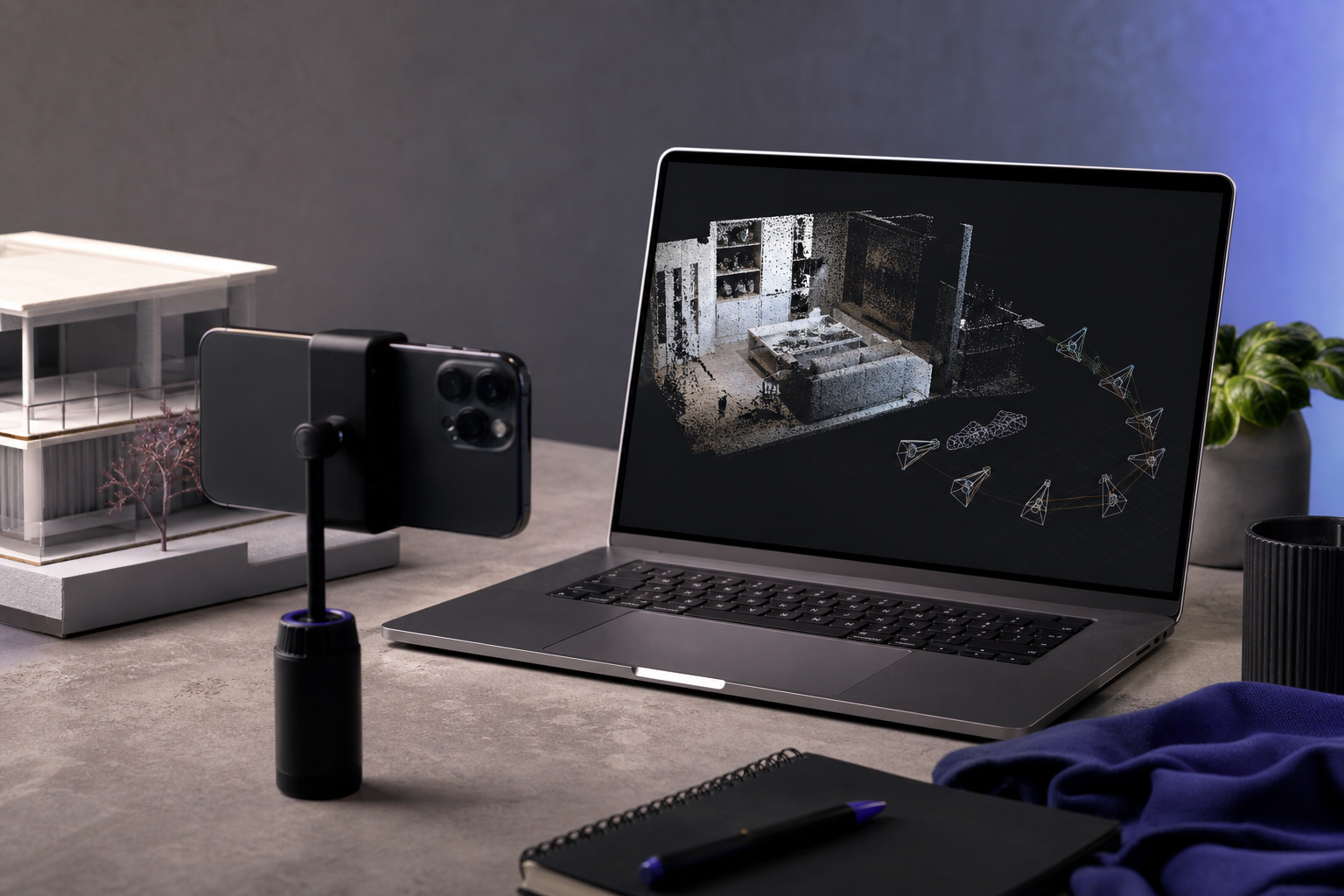
How to Export Camera Pose Data From a LiDAR 3D Scanner for NeRF and SLAM
You just captured a 90-second walkthrough of a living room with your iPhone LiDAR 3D scanner. The textured mesh looks clean. The point cloud is dense. Then your Nerfstudio training run errors out with missing transforms.json — and you realize the geometry was never the problem. The most common failure point in mobile-LiDAR-to-NeRF pipelines isn't the scan itself. It's the camera pose data: the per-frame 4×4 matrices describing where the phone was in space at each video frame. That data is either missing, locked behind a Pro subscription, or buried inside proprietary ARKit ZIP bundles that need a custom Python converter just to open.
Per Nerfstudio's documentation, training NeRF on custom data requires camera poses for every image. No pose, no training. Voxelio's Pose+Video mode exports HEVC video paired with frame-accurate camera poses as standard JSON and CSV — no Pro tier, no ZIP archaeology, no vendor-specific converter required.
Table of Contents
- Why Pose Data Decides Whether Your NeRF Trains or Crashes
- Matching Your Pipeline to the Right Pose Format
- What Pose+Video Mode Actually Records (Field-by-Field)
- The Complete Export Workflow — From Scan to Training-Ready Dataset
- Pose+Video vs. Point Cloud Mode — Choosing the Right Capture Path
- The 9-Point Pose Validation Checklist (Run Before Every Training Job)
- Troubleshooting Pose Export and Pipeline Integration
Why Pose Data Decides Whether Your NeRF Trains or Crashes
The hard rule comes straight from the Nerfstudio custom data guide: training NeRF on your own footage requires knowing the camera pose for every image. This is non-negotiable. Without poses, image-only pipelines fall back to COLMAP-based Structure-from-Motion (SfM), which can take hours and frequently fails on textureless surfaces — white walls, glass, polished concrete, reflective flooring. Anyone who has watched a COLMAP run die on frame 247 of a 600-frame sequence knows the pain of starting over with no diagnostic except "feature matching failed."
A LiDAR 3D scanner sidesteps this entire failure class. When a mobile LiDAR app captures pose data directly from ARKit, the COLMAP step can be skipped outright. Nerfstudio's own documentation states that for Polycam LiDAR/Room mode captures, "COLMAP is not needed" because the app already provides reliable poses. The same logic applies to any Pose+Video export from Voxelio. The practical impact: skipping COLMAP on a 60–90 second scan saves anywhere from roughly 30 minutes to 4 hours of preprocessing, depending on scene complexity and whether your SfM run would have converged at all.
Three workflows demand pose data directly:
NeRF and Gaussian Splatting training. Nerfstudio's transforms.json schema expects a camera-to-world 4×4 matrix plus intrinsics (fx, fy, cx, cy) per frame. Instant-NGP and Nerfacto inherit the same expectation because they consume the same file format.
SLAM benchmarking and ground-truth trajectories. ORB-SLAM2/3, Kimera, and ROS-based pipelines consume TUM-format trajectory files: timestamp tx ty tz qx qy qz qw, space-separated, one frame per line. Voxelio's CSV export maps directly onto this convention.
Photogrammetry hybrid pipelines. Metashape XML and RealityCapture CSV camera exports are first-class Nerfstudio inputs. Pairing LiDAR poses with photogrammetric reconstructions is a recognized hybrid workflow.
One counter-point worth stating bluntly: NeRF does not yield standard polygon meshes. KIRI Engine's NeRF explainer notes that NeRF "cannot yet export the data as the kind of standard mesh" expected in CAD, BIM, or 3D printing workflows. If your end goal is a watertight STL for fabrication, stay in Mesh mode and export OBJ or USDZ. Pose+Video is the right tool when your downstream consumer is a radiance field, a trajectory evaluator, or a research pipeline that wants raw ARKit poses without vendor smoothing.
The cost framing matters too. In his 3D scanning walkthrough, educator Gerry Li flags that competing apps like Polycam gate FBX export behind a Pro subscription and require workarounds for raw data access. If you want a truly free 3D scanner app that exposes camera poses without a paywall, the JSON and CSV outputs from Voxelio's Pose+Video mode are unrestricted on-device, no account required.
Skipping COLMAP isn't a convenience — it's a 30-minute to 4-hour preprocessing cut that decides whether you iterate three times today or once tomorrow.
Matching Your Pipeline to the Right Pose Format
Nerfstudio alone supports at least eight distinct pose-bearing input formats: images, video, Polycam, Record3D, Metashape, RealityCapture, Project Aria, and Spectacular AI. Each format encodes coordinate conventions, intrinsics, and per-frame metadata slightly differently. Pick the wrong target format and you'll either re-export the scan or write a converter from scratch. Use the decision matrix below to locate your pipeline before you tap export.
| Pipeline / Framework | Expected Pose Format | Convention | Per-Frame Data | Voxelio Export Path |
|---|---|---|---|---|
| Nerfstudio / Nerfacto | transforms.json | OpenCV, column-major | 4×4 cam-to-world + fx, fy, cx, cy | Pose+Video → JSON (direct) |
| Instant-NGP | transforms.json (NS-compatible) | OpenCV | 4×4 + intrinsics | Pose+Video → JSON (direct) |
| COLMAP (sparse) | cameras.txt + images.txt + points3D.txt | OpenCV | Quaternion + translation per image | Pose+Video → JSON → converter script |
| ORB-SLAM2/3 (TUM) | trajectory.txt | TUM | timestamp tx ty tz qx qy qz qw | Pose+Video → CSV (direct mapping) |
| ROS / ROS2 SLAM | .bag or .csv | TUM or custom | Stamped Pose + TF tree | Pose+Video → CSV → rosbag wrapper |
| Gaussian Splatting (3DGS) | COLMAP format | OpenCV | Same as COLMAP | Pose+Video → JSON → COLMAP converter |
| Polycam pipeline (reference) | Polycam raw ZIP | Proprietary | Bundled, requires ns-process-data polycam |
N/A — replaces this step |
Two conventions dominate the field and quietly cause most "my NeRF is upside-down" bugs. OpenCV uses a right-handed, column-major system with -Z forward (camera looks down its negative Z axis). OpenGL uses a right-handed, column-major system with +Z back. Voxelio exports OpenCV — the same convention Nerfstudio assumes by default — so transforms.json drops in without an axis-flip.
TUM format is the lingua franca of SLAM benchmarking. The TUM RGB-D and EuRoC MAV datasets both publish ground-truth trajectories as timestamp tx ty tz qx qy qz qw, space-separated. Tools like evo and rpg_trajectory_evaluation consume this format natively. Voxelio's CSV export emits exactly this column layout, which means you can rename poses.csv to groundtruth.txt and run trajectory metrics in one command.
The Polycam comparison is instructive. Nerfstudio's Polycam path requires unzipping a raw bundle and running ns-process-data polycam to convert proprietary fields into the standard JSON schema. The Voxelio JSON already conforms to that schema, so the conversion step disappears. If you're managing multiple export formats across a NeRF research project and a SLAM benchmark, capturing once and exporting twice (JSON for one pipeline, CSV for the other) keeps a single source of truth.
Locate your row in the table. The right-hand column tells you which export mode to select in the workflow section below.
What Pose+Video Mode Actually Records (Field-by-Field)
Before integrating any export into a training pipeline, you should know exactly what fields land in the bundle. The contents are deliberately minimal and pipeline-friendly.
- HEVC video stream (.mp4 container). H.265 codec, 1920×1440 or 1920×1080 depending on iPhone model, captured at 30 fps or 60 fps. Every frame has a corresponding pose record. HEVC was chosen over H.264 because it produces roughly 40% smaller files at equivalent quality — a real difference when you're uploading 60-second scans to a cloud GPU instance over hotel Wi-Fi.
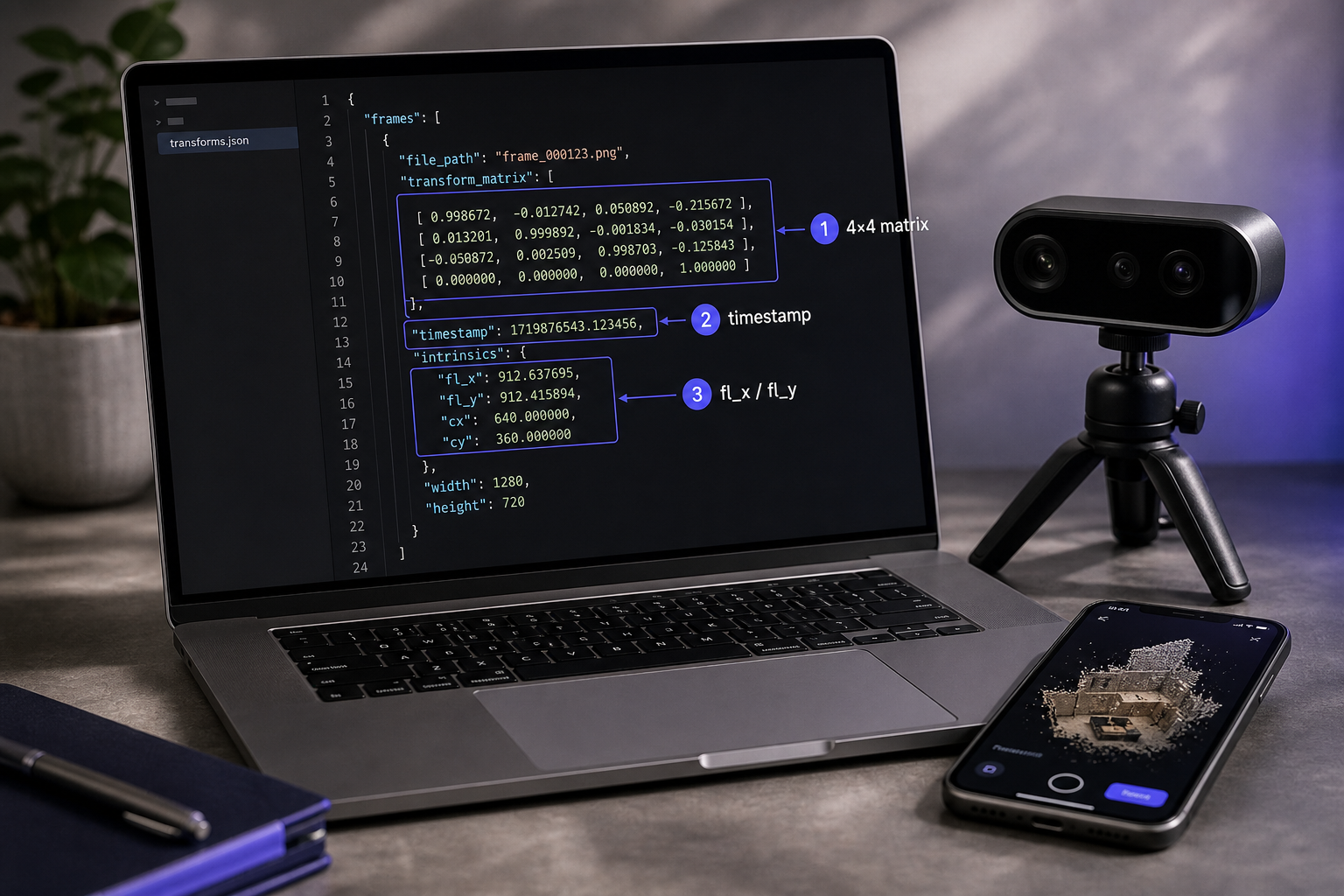
- Frame-by-frame camera pose (4×4 matrix). Written as 16 floats per frame in the JSON
transform_matrixfield. OpenCV convention: rows 0–2 contain the rotation, column 3 contains the translation in meters (ARKit world units are meters by spec). The last row is always[0, 0, 0, 1]. This matches Nerfstudio's expected schema for custom data exactly. - Camera intrinsics block. Focal length in pixels (
fx,fy), principal point (cx,cy), and image dimensions (w,h). Typical iPhone 13 Pro values at 1920×1440 capture: fx ≈ fy ≈ 1450, cx ≈ 960, cy ≈ 720. The Nerfstudio transforms.json requires these exact fields under the keysfl_x,fl_y,cx,cy,w,h. - Per-frame timestamp (microsecond precision). ARKit timestamps in seconds (float), monotonically increasing from scan start. SLAM pipelines use timestamps for IMU-camera sync; NeRF pipelines use them for frame indexing and deduplication during downsampling.
- Shared world coordinate frame. All poses live in a single ARKit-anchored coordinate system established at scan start. Y is up, gravity-aligned. No loop-closure correction is applied — what ARKit reports per frame is exactly what gets written to disk. This preserves reproducibility for SLAM research where the whole point is benchmarking against an uncorrected trajectory.
- What's deliberately excluded. No raw IMU streams (use a dedicated ROS recorder if you need 100 Hz accelerometer data), no per-pixel depth maps (capture a Point Cloud pass for that), no loop-closure metadata or vendor-specific smoothing. Pose+Video is a thin, faithful pipe from ARKit to your pipeline.
Now that you know what's in the box, here's how to get it out.
The Complete Export Workflow — From Scan to Training-Ready Dataset
This is the operational core. Capture, export, validate, ingest — eight steps from device to GPU.

Step 1 — Pre-scan setup
Pose quality is set before you tap record. Four conditions matter:
- Scene type: static. Moving subjects — people, pets, wind-blown curtains, ceiling fans — degrade ARKit's pose tracking because feature points appear to move relative to the world frame.
- Lighting: 200+ lux minimum. ARKit fuses LiDAR depth with RGB feature tracking; in dim rooms the LiDAR keeps working but the RGB feature tracker drops out, and pose quality degrades even though geometry capture continues.
- Subject distance: 0.5–5 meters. iPhone LiDAR's effective range tops out around 5m; beyond that, depth noise compounds and pose error grows.
- Movement speed: walk at ~0.3 m/s for room scans, orbit at ~10°/second for objects. Faster motion increases the chance of tracking jumps.
Step 2 — Open Pose+Video mode
Launch the app, tap the mode selector, and choose Pose+Video. Confirm the on-screen tracking indicator is green before recording. Yellow or red means ARKit hasn't locked tracking — give it 2–3 seconds of slow lateral motion to acquire features.
Step 3 — Capture
Typical scan length is 30–120 seconds. Longer scans accumulate more drift; shorter scans may not deliver enough viewpoints for NeRF to converge.
For NeRF, aim for 60–90 seconds, moving in a loose spiral or orbit around the subject. Nerfstudio's ns-process-data video step typically subsamples to a target frame count anyway, so over-capturing is harmless and gives the frame selector more material to work with. For SLAM benchmarking — including room-scale architectural captures — walk a deliberate trajectory (figure-8 or closed loop) so you can later evaluate drift and loop-closure performance against the raw ARKit trajectory.
Step 4 — Export
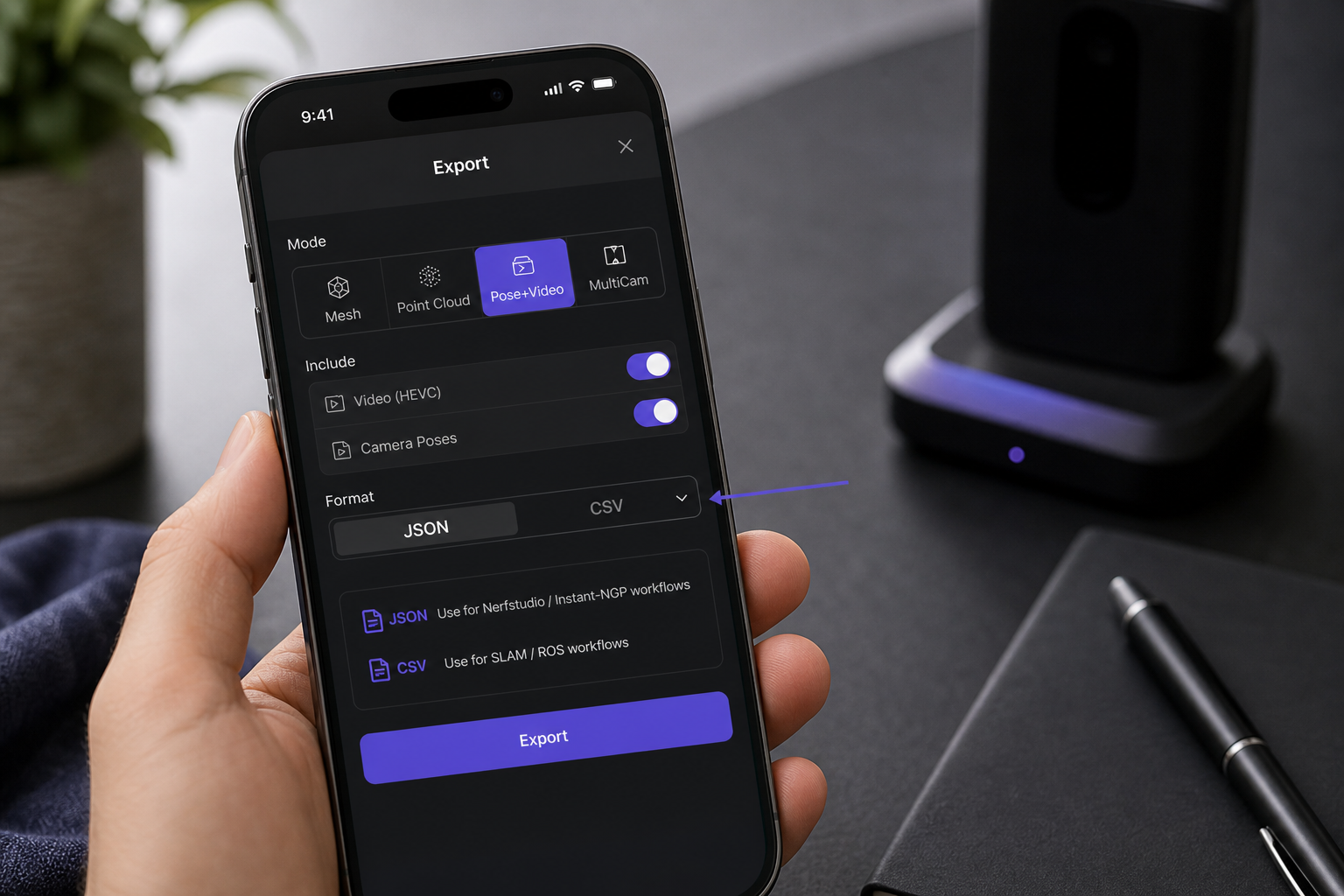
Tap stop. On the preview screen, tap Export. Choose JSON for a Nerfstudio-compatible transforms.json, or CSV for a TUM-compatible trajectory file. AirDrop to a Mac is the fastest transfer path for 200–400 MB scan bundles; the Files app with iCloud sync works too but adds upload latency.
Step 5 — File structure on disk
After export, your bundle looks like this:
scan_2025XXXX/
  ├── video.mp4          (HEVC, ~250 MB for 60s at 30fps)
  ├── transforms.json    (Nerfstudio format) OR poses.csv (TUM format)
  └── intrinsics.json    (if not embedded in transforms.json)
Step 6 — Ingest into Nerfstudio
Place transforms.json and video.mp4 in a single directory. Then run:
ns-process-data video --data video.mp4 --output-dir ./processed --num-frames-target 300
Because poses are already provided, Nerfstudio uses them instead of running COLMAP. This is the entire payoff of LiDAR-based capture: the SfM step that would have eaten 30 minutes to 4 hours of CPU time is gone. Launch training with:
ns-train nerfacto --data ./processed

Step 7 — Ingest into a SLAM benchmark
For TUM-format evaluation, rename poses.csv to groundtruth.txt, confirm it's space-separated (not comma-separated — evo is strict), and drop it into your evaluation tool. For ROS playback, write a 5–10 line Python wrapper around rosbag.Bag.write that reads the CSV row-by-row and publishes on a /camera/pose topic with synced video frames.
Step 8 — Ingest into Gaussian Splatting (3DGS)
3DGS expects COLMAP format (cameras.txt, images.txt, points3D.txt), not Nerfstudio JSON. Run a JSON-to-COLMAP converter — the same pattern the ARKit-to-COLMAP community workflow uses, except starting from clean JSON instead of proprietary ARKit ZIP archives. The conversion is straightforward: each frame's 4×4 becomes a quaternion + translation row in images.txt, the intrinsics block becomes one entry in cameras.txt, and points3D.txt can start empty (3DGS densifies during training).
If any step produces unexpected output, jump to the troubleshooting matrix before re-scanning.
The most expensive bug in mobile-LiDAR-to-NeRF pipelines isn't a bad pose — it's a timestamp off-by-one that surfaces after four hours of training.
Pose+Video vs. Point Cloud Mode — Choosing the Right Capture Path
Many researchers default to Point Cloud mode because it sounds more "3D-research-friendly." For NeRF training, this is wrong. Point Cloud mode exports a colored PLY — pure geometry, no per-frame poses, no video stream. It's the right tool for CloudCompare and MeshLab, the wrong tool for Nerfstudio.
| Criterion | Pose+Video Mode | Point Cloud Mode |
|---|---|---|
| Primary output | HEVC video + per-frame 4×4 poses | Colored PLY point cloud |
| Pose data included | Yes — JSON or CSV | No |
| Typical file size (60s scan) | 200–400 MB | 50–150 MB |
| Color / texture | RGB per video frame | Per-point RGB |
| Best for | NeRF, 3DGS, SLAM, photogrammetry hybrids | CloudCompare, MeshLab, direct CAD import |
| Required by Nerfstudio | Yes | No (unusable alone for NeRF) |
| Works for 3D printing | Indirectly (NeRF→mesh extraction) | Yes (convert PLY → mesh) |
| ARKit pose stored | Per-frame, OpenCV convention | Not exported |
The Nerfstudio Record3D integration is instructive here. Even though Record3D produces dense per-frame PLY point clouds, the Nerfstudio path still requires pairing them with camera poses — geometry alone is never enough for NeRF training. The same logic applies to any point cloud you might already have: without poses, it can serve as an auxiliary supervision signal but cannot replace the camera trajectory.
If you want both geometry and poses of the same subject, capture two passes: a Pose+Video pass for the NeRF or 3DGS pipeline, and a Point Cloud pass for direct geometric reference in CloudCompare. The point cloud also helps with multi-scan registration later (ICP alignment between scans needs explicit geometry, not radiance fields).
The counter-case is CAD reverse engineering and 3D printing. As KIRI Engine notes, NeRF does not currently export standard meshes the way photogrammetry or LiDAR tools do. For a printable STL, Point Cloud mode (or Mesh mode for direct OBJ/USDZ output) wins decisively. NeRF-to-mesh extraction tools exist (marching cubes on the density field), but the resulting meshes are noisy, non-watertight, and rarely production-ready without manual cleanup.
The 9-Point Pose Validation Checklist (Run Before Every Training Job)
Treat this as a 10-minute insurance policy against an 8-hour failed training run. Nerfacto on a 60-second scan typically runs 30 minutes to 8 hours on a single GPU. The ROI is obvious.
- File presence and integrity. Confirm
transforms.json(orposes.csv) sits in the same directory asvideo.mp4. Open the file in a text editor: it should end with a closing}for JSON or a final newline for CSV. Truncated exports usually mean the share-sheet operation was interrupted mid-write. - Frame count = pose count (±1 tolerance). Run
ffprobe -v error -count_frames -select_streams v:0 -show_entries stream=nb_read_frames video.mp4to get the video frame count, then compare against the number oftransform_matrixentries in JSON. Off-by-one is harmless (first or last frame). Off-by-more indicates dropped poses or a paused encoder. - Pose matrix shape. Every pose should be a 4×4 list of lists in JSON, or 16 floats per row in CSV. Spot-check five random poses for the right shape and a sensible bottom row of
[0, 0, 0, 1]. - No NaN or Inf values. Run
grep -i "nan\|inf" transforms.json— it should return nothing. NaN poses come from ARKit losing tracking mid-scan. The scan is recoverable only by excluding the NaN-marked frames from training (see Step 5 in the troubleshooting section). - Rotation block orthogonality. Pick one pose. Its top-left 3×3 block should be a valid rotation: determinant ≈ +1, orthogonal columns. Quick Python check:
import numpy as np assert np.allclose(R @ R.T, np.eye(3), atol=1e-3) assert np.isclose(np.linalg.det(R), 1.0, atol=1e-3) - Translation magnitudes are physical. Translations are in meters. Frame-to-frame deltas above 0.5 m usually mean motion was too fast or ARKit tracking jumped. Sustained deltas below 1 mm suggest the device was stationary — fine for object turntable captures, problematic for room scans that need parallax to triangulate depth.
- Timestamp monotonicity. Timestamps must strictly increase. No duplicates, no decreases. A quick sanity check:
sort -c poses.csvshould exit without error. - Intrinsics sanity. Expect
fxandfybetween 1000 and 1600 pixels for iPhone 12 Pro through 15 Pro at 1920×1440 capture. Values far outside that range indicate a corrupted or mis-parsed intrinsics block. - Visual coherence in the Nerfstudio viewer. Run
ns-viewer --load-config ./processed/config.ymland confirm the camera frustums form a continuous trajectory matching the path you walked. Scattered frustums = pose drift. Frustums collapsed to a single point = scale collapse (treat the scan as unusable).
Ten minutes of validation prevents eight hours of GPU time spent training a NeRF on broken poses.
Troubleshooting Pose Export and Pipeline Integration
These are the failure modes you will actually hit. Each entry pairs a symptom with a diagnosis and a fix.
- "Export gave me a video but no JSON or CSV." The pose file is written as a separate artifact in the same share bundle. If you AirDropped, both files land in the Downloads folder. If you used Files → iCloud, confirm the share completed — poses are written last and can be cut off if you dismiss the share sheet early. Re-export from the scan's history view rather than re-scanning.
- "Nerfstudio errors with 'transforms.json not found' even though the file exists." Nerfstudio expects
transforms.jsonat the root of the data directory, not inside a nested subfolder. Move it next to yourimages/directory or video file. Also confirm filename casing matches exactly —Transforms.json(with a capital T) will fail silently on case-sensitive filesystems. - "My pose count is 1,847 but the video has 1,802 frames." A mismatch greater than ±1 usually means the scan was interrupted mid-capture (incoming call, app backgrounded, Focus mode triggered). ARKit kept logging poses, but the video encoder paused. Re-scan with notifications disabled and the app foregrounded. If you can't re-scan, trim the JSON to the first 1,802 entries before ingesting.
- "The reconstruction is rotated 90° in my NeRF viewer." Voxelio exports ARKit's Y-up convention. Some downstream tools (Blender, certain COLMAP visualizations) expect Z-up. Apply a single 90° rotation around the X-axis once at ingest — not per-frame. The ARKit-to-COLMAP community pipeline handles this with one matrix multiply at the start of the converter; mirror that approach.
- "All my poses are zero or NaN starting at frame 400." ARKit lost tracking mid-scan. Common triggers: pointing at a blank white wall for too long, abrupt lighting changes (walking through a doorway into a dark room), or rapid panning faster than ~30°/second. The first 399 frames remain usable. Trim the JSON/CSV to that range and trim the video to match: at 30 fps, 400 frames is 13.3 seconds, so
ffmpeg -ss 0 -t 13.3 -c copy video_trim.mp4gives you a usable shorter clip. - "I need TUM format but I exported JSON." No vendor tool required. A 15-line Python script parses the JSON and writes
timestamp tx ty tz qx qy qz qwper frame. The quaternion comes from the 3×3 rotation block viascipy.spatial.transform.Rotation.from_matrix(R).as_quat()— note that scipy returns[x, y, z, w]order, which is the TUM convention. - "3DGS training crashes on my data." 3DGS expects COLMAP
images.txtandcameras.txt, not Nerfstudio JSON. Convert via a community-maintained Nerfstudio-to-COLMAP script (several are available on GitHub). This is structurally the same path documented in the ARKit-to-COLMAP demo, except clean JSON skips the ARKit ZIP-archaeology step that's the most fragile part of the original pipeline. - "I want to combine multiple scans into one NeRF." Each scan has its own ARKit world origin — coordinate frames don't carry across captures. Pick one scan as the reference and compute a rigid transform aligning the other scans' first poses to the reference frame. Procrustes alignment works if you have shared feature correspondences; ICP on overlapping geometry works if you also captured Point Cloud mode for each scan. Maintaining clean naming and metadata across multi-scan projects becomes its own discipline once you're working at scale.
Your next scan should produce a transforms.json that drops directly into ns-train nerfacto. If the validation checklist passes, training will start within a minute of export. If it doesn't, the troubleshooting entry above almost certainly matches your error — the failure modes in mobile-LiDAR-to-NeRF pipelines are well-mapped, and an open JSON/CSV format means you can debug with any text editor instead of waiting on a vendor support ticket.