
Gaussian splatting on iPhone, in Voxelio, turns a short guided capture into a navigable, photorealistic 3D scene that is trained and rendered directly on the phone rather than on a desktop or in the cloud. Instead of building clean, editable surfaces, this mode stores the scene as many tiny 3D "splats" — anisotropic Gaussians that carry color, opacity, size, and orientation — and blends them in real time as you move a virtual camera. The decision you are really making is between visual realism and editable geometry: a splat scene looks convincing from every viewpoint, while a mesh or point cloud gives you something you can measure and machine. This guide explains how our Gaussian Splatting pipeline works on iPhone, which mode fits which job, and where the honest limits sit.
Table of contents
What "gaussian splatting iphone" really means
A Gaussian splat scene represents 3D space as a cloud of soft, oriented ellipsoids, each holding its own color, opacity, and shape. When you render them, they overlap and blend to reproduce how the scene looked from the cameras that captured it. That is a different goal from a triangle mesh. A mesh describes surfaces you can slice, measure, and export to CAD; a splat scene describes appearance — how light, gloss, and fine texture read from a given viewpoint.
In Voxelio, the Gaussian Splatting workflow captures source images and camera data on the iPhone, trains the splat representation on the same device, and then lets you explore or export the finished scene without leaving the phone. That local loop is the defining trait of this mode, and it is why it sits next to LiDAR meshes, point clouds, RoomPlan, Object Capture, and dual-camera video inside one app: you pick the mode that matches your project and hardware, not the other way around.
Because splats prioritize view-dependent appearance over clean surfaces, they earn their place in a few specific situations:
- Immersive walkthroughs of small spaces with complex materials, such as store corners, showcases, or art installations.
- Research and robotics pipelines that need calibrated camera trajectories alongside a learned scene representation.
- Product and portfolio shots where realism and lighting matter more than watertight geometry.
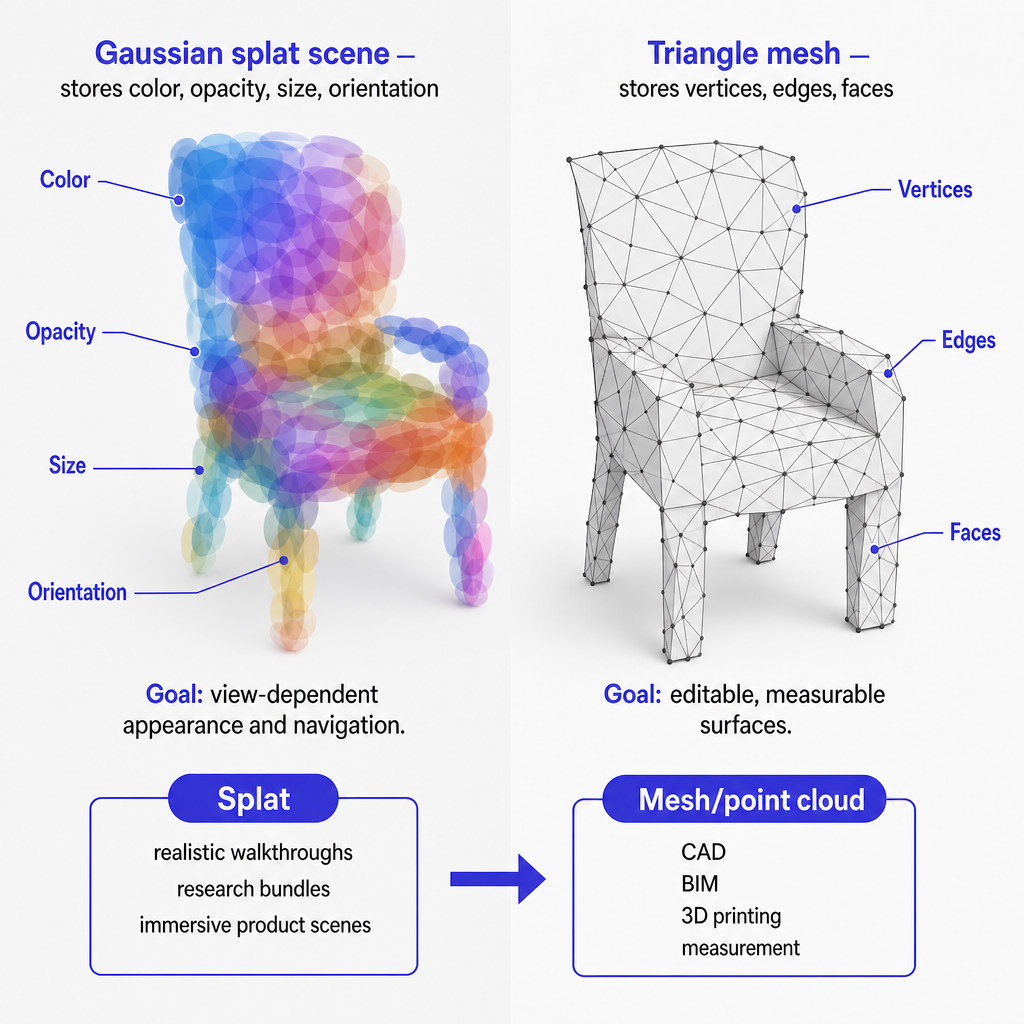
When to choose Gaussian splatting in Voxelio
Every capture in Voxelio starts with a mode, and the mode decides the output. So the first question is not "which format do I want" but "what is my scene, and what will I do with it afterward." Three broad answers cover most projects:
- A splat scene (Gaussian Splatting) when visual realism and free navigation are the point.
- A mesh or point cloud when you need measurement, CAD, BIM, or 3D printing.
- A RoomPlan or Object Capture export when you need a structured room model or a standalone product model.
Our "Best iPhone 3D Scanner App in 2026" guidance is explicit that the Gaussian workflow is designed for small scenes and can be trained on iPhone, but that processing time depends on scene size, device performance, storage, and thermal conditions. That points to a clear fit: keep the capture compact — a corner, an object display, a workstation — and lean on splatting when you care most about believable visuals rather than precise, editable geometry.
The inverse cases are just as clear. If you need structured walls, doors, and furniture for floor plans or interior layout, RoomPlan and LiDAR mesh modes are the right tools. If you need watertight, shareable models of individual products in USDZ for e-commerce, Object Capture is the better choice. And when you need camera trajectories and HEVC video for NeRF, SLAM, or custom photogrammetry, our LiDAR and MultiCam modes export calibrated source bundles and camera poses that feed those pipelines directly. For a deeper look at the sensor side of these modes, our explainer on how the iPhone LiDAR scanner works covers the depth hardware that many of them rely on.
How our Gaussian Splatting pipeline works on iPhone
Capture and calibration
Our capture stack is built on Apple's ARKit world tracking and LiDAR depth fusion. For Gaussian Splatting specifically, the app collects synchronized RGB frames, device motion, and depth samples through ARKit world tracking. In MultiCam mode, it uses ARKit's multi-camera support and device motion to synchronize multiple camera streams together with LiDAR depth, organizing everything into capture bundles suited to on-device Gaussian Splatting training or export.
What makes those bundles useful is calibration. Each one carries per-frame camera poses, intrinsics, and metadata, so the training stage can estimate where each pixel sits in 3D space. Our SLAM article describes these source bundles as the input format for NeRF training, Gaussian Splatting reconstruction, and SLAM algorithm validation, and stresses the value of a ground-truth camera trajectory. The same calibrated bundle drives our on-device splat training. For the underlying tracking and depth-fusion mechanics that produce these poses, see our breakdown of how your iPhone captures the real world in 3D.
On-device training
Both our Gaussian mode page and homepage make the same point: the training workflow runs entirely on the iPhone. The app captures a small scene, trains it locally, and exports the finished splat without handing the job to a desktop or cloud service.
Training itself is an optimization loop. The system adjusts the parameters of many Gaussians — positions, sizes, orientations, colors, and opacities — so that the rendered views match the captured images from each known camera pose. Our public demo of the on-device pipeline shows this flow end to end: SwiftUI and ARKit capture, on-device training checkpoints, and Metal-based splat rendering, confirming that the essential loop stays on the phone. Because it runs locally, processing time depends on scene size, device performance, storage, and thermal conditions, which is exactly why the mode is tuned for small scenes.
Rendering and export
Once a scene is trained, we render the splats on-device so you can navigate them interactively before deciding what to keep. From the same workspace you can export a trained splat scene file for use in compatible Gaussian viewers, and a calibrated source bundle that includes JSON metadata, camera poses, intrinsics, and textures.
That shared workspace is the quiet advantage. Our homepage lists exports across trained splats, USDZ, OBJ with MTL, STL, PLY, HEVC video, JSON, poses, intrinsics, textures, and metadata, while the SLAM article confirms the LiDAR stack exports textured OBJ and USDZ meshes, colored PLY point clouds, and HEVC video with frame-accurate camera poses. Gaussian captures live in the same project space as those meshes, point clouds, video, and camera data, so a single capture session can feed several downstream tools.
Capture modes, outputs, and device requirements
The table below maps our core modes to what they capture, what they export, and the hardware they expect, so you can see where Gaussian Splatting fits.
| Mode | What it captures | Primary outputs | Device / OS notes |
|---|---|---|---|
| Gaussian Splatting | Small viewable scenes via ARKit world tracking and optional LiDAR depth | Trained splat scene plus calibrated source bundle (images, JSON, poses, intrinsics, textures, metadata) | Supported iPhone with ARKit, designed for iOS 18+; MultiCam gaussian needs rear LiDAR on Pro devices (iPhone 12 Pro and later) |
| LiDAR Mesh | Room and environment meshes via ARKit SLAM and LiDAR depth fusion | Textured OBJ, USDZ meshes, colored PLY point clouds, HEVC video with frame-accurate poses | LiDAR Pro-class iPhones from iPhone 12 Pro and specific iPad Pro models, iOS 18+ |
| Point Cloud | Dense point samples of geometry and color from LiDAR and ARKit | Colored PLY point clouds plus optional meshes and camera video | Same LiDAR requirements as mesh modes, iOS 18+ |
| RoomPlan | Structured room layouts via Apple RoomPlan | USDZ plus JSON room models (walls, floors, doors, windows, openings, furniture) | Requires RoomPlan support; quality depends on visibility, room complexity, and available classifications |
| 3D Objects | Standalone object models via Apple Object Capture photogrammetry | USDZ object models with textures for product display and AR | Hardware that supports Object Capture with current iOS and ARKit; confirm support in-app |
| Dual Camera / MultiCam | Dual-camera and LiDAR bundles for advanced pipelines and gaussian training | Multi-stream HEVC video, synchronized depth, camera poses, capture bundles | Needs ARKit MultiCam plus rear LiDAR and world tracking, primarily iPhone 12 Pro and later |
This mapping reflects our own descriptions of modes, outputs, and hardware requirements. The pattern to notice: Gaussian Splatting shares its ARKit and LiDAR foundation with the mesh and MultiCam modes, which is why the same capture can double as research-grade source data.
Availability, pricing, and platform support
We publish as "Voxelio 3D LiDAR Scanner" on the Apple App Store, available for both iPhone and iPad. The listing describes the app as turning supported iPhone and iPad devices into a 3D capture workspace for LiDAR scanning, room scans, object capture, point clouds, meshes, RoomPlan exports, photogrammetry, and Gaussian splats created locally on device.
The app is free to download, with no mandatory subscription, so anyone with a compatible Pro iPhone can start capturing without buying extra hardware. Alongside the free base, the App Store listing documents optional in-app purchases, including Pro Access tiers and a Pro Lifetime unlock (for example, Pro Lifetime around $149.99, with other Pro Access options in the single- and double-digit dollar ranges). Our 2026 comparison guide advises checking export and scan limits inside the app, which is where you will see which advanced outputs or limits are tied to Pro access rather than being universally free.
On platform support, we position the app as a 3D scanner and Gaussian Splatting tool for iPhone, and it requires iOS 18 or later. Compatibility notes and LiDAR documentation consistently reference iPhone 12 Pro and later, plus specific iPad Pro models with LiDAR, as the primary device range. There is no published Android app in our first-party materials, so the current, verifiable offer is limited to iOS devices; Android is represented only by a waitlist, not a shipping product.
Decision criteria, risks, and practical examples
Matching the mode to the job
For architects, interior designers, and real estate professionals, the split is between editable geometry and immersive visuals. LiDAR mesh and RoomPlan generate meshes and structured USDZ/JSON room layouts that suit CAD, BIM, and floor-plan work. Gaussian Splatting earns its keep when you want to walk a client through a visually accurate niche — a feature wall, a staircase, a display — without needing to edit walls and dimensions afterward.
Engineers and makers usually prioritize measurement and CAD interoperability, so meshes and PLY point clouds from LiDAR modes tend to be more useful than splats. A splat can still help you judge how a polished part, a wiring loom, or a housing reads in context, but it is not a substitute for a solid model. E-commerce and marketplace sellers get the most from Object Capture's USDZ models and textures for individual products; splatting complements that when the goal is an immersive product nook or small showroom scene rather than a single asset.
CV and robotics researchers often need camera poses, multi-stream video, and depth data for NeRF, Gaussian Splatting, and SLAM experiments. Our SLAM workflow exports HEVC video with frame-accurate camera poses and colored PLY point clouds that feed reconstruction and algorithm validation, and MultiCam bundles extend this by synchronizing multiple camera streams and depth samples for on-device training or export. DIY hobbyists and 3D printing enthusiasts lean on LiDAR mesh and point cloud modes for fabrication references, while splatting offers an accessible way to capture visually rich scenes without standing up a desktop training pipeline. To compare the free entry points across modes, our roundup of the best free 3D scanner apps for iPhone is a useful next stop.
Where results vary, and what we do not claim
Our documentation is candid that detection and reconstruction quality depend on scene visibility, complexity, and the classification limits in Apple's frameworks. For Gaussian Splatting, a handful of conditions reliably move the outcome:
- Lighting: very low light, extreme contrast, or flickering sources degrade image quality and training stability.
- Texture and reflectivity: blank walls give the system nothing to lock onto, while glass, mirrors, and gloss are hard for camera-based methods to reconstruct reliably.
- Motion: moving people, vehicles, or swaying foliage create frame-to-frame inconsistencies that training must ignore or will misread.
- Scene size: the workflow is built for small scenes, and both practicality and processing time worsen as you push size and capture duration.
- Hardware: devices without LiDAR, MultiCam, or enough compute and thermal headroom may not qualify for gaussian modes or may train more slowly.
For those reasons we do not claim centimeter-level precision or universal hardware support. The published compatibility range centers on Pro-class iPhones and specific LiDAR iPad Pro models, and our guidance is to confirm LiDAR and feature availability in the app before you commit to a critical project. Treat the mode as a strong tool for realistic small-scene capture — and verify device support and export limits first rather than assuming them.
Frequently asked questions
What do I need to run gaussian splatting on my iPhone?
You need a Voxelio-supported iPhone running iOS 18 or later with ARKit support. MultiCam gaussian workflows additionally require a rear LiDAR-equipped Pro model, typically iPhone 12 Pro or later.
Can Voxelio train gaussian splats entirely on-device?
Yes. Small Gaussian Splatting scenes are captured, trained, and exported directly on the iPhone, without moving the job to a desktop or cloud service, as shown in our gaussian mode documentation and public on-device demo.
What can I export from a gaussian capture?
You can export a trained splat scene plus a calibrated source bundle with images, JSON metadata, camera poses, intrinsics, and textures, alongside formats such as OBJ, USDZ, PLY, STL, and HEVC video when they are available in the project.
Is Voxelio free, and what does Pro change?
Voxelio is free to download with no mandatory subscription. The App Store listing documents optional Pro in-app purchases, including Pro Access tiers and a Pro Lifetime unlock; check export and scan limits inside the app to see which features require Pro.
Does Voxelio support Android for gaussian splatting?
Current first-party materials and App Store listings show Voxelio as a 3D scanner and Gaussian Splatting app for iPhone and iPad on iOS 18+, with no published Android app; Android is represented only by a waitlist.
How consistent are results across different scenes and materials?
Results vary with lighting, texture, motion, reflective surfaces, scene size, and the capabilities of the supported device. Detection and reconstruction quality track scene visibility, complexity, and hardware, so compact, well-lit, textured scenes reconstruct most reliably.